返回

我的前端三剑客学习笔记

目录

前置操作

visual studio code 安装HTML CSS SupportLIVE Serverauto rename tag

HTML 笔记

 1
 2
 3
 4
 5
 6
 7
 8
 9
10
11
    <h1>HelloWorld!!!</h1>
    <h2>writer:aobara</h2>
    <h3>三级标签</h3>
    <h4>四级标签</h4>
    <h5>五级标签</h5>
    <h6>六级标签</h6>
    <p>段落标签,<b>加粗</b><i>斜体</i><u>下划线</u><s>删除线</s></p>
    <p>下一行  ,<strong>使用'strong'也可以加粗</strong></p>

<br>换行  
<hr>分割行

插入图片

属性名称不区分大小写,属性值区分大小写
e.g.

1
2
3
    <img src="a.jpg">
    <img SRC="a.jpg">
    <img src="A.jpg">

一二作用一样但三与一二都不一样。

插入表格

无序列表(<ul>

 1
 2
 3
 4
 5
 6
 7
 8
 9
10
11
12
13
    <ul>
        <li>这是无序列表(unorder)</li>
        <li>这是无序列表(unorder)</li>
        <li>这是无序列表(unorder)</li>
        <li>这是无序列表(unorder)</li>

    </ul>
    <dl>
        <li>这也是无序列表,但不缩进</li>
        <li>这也是无序列表,但不缩进</li>
        <li>这也是无序列表,但不缩进</li>
        <li>这也是无序列表,但不缩进</li>
    </dl>

每一项前会有·

有序列表(<ol>

1
2
3
4
5
6
    <ol>
        <li>这是有序列表1(order)</li>
        <li>这是有序列表2</li>
        <li>这是有序列表3</li>
        <li>这是有序列表4</li>
    </ol>

每一项前有数字序号1.

表格

 1
 2
 3
 4
 5
 6
 7
 8
 9
10
11
12
13
14
15
16
17
18
19
20
21
22
23
table row(行,tr)
table header(列,th)
td=tableDate
t

    <table>
        <th>列标题1</th>
        <th>列标题2</th>
        <th>列标题3</th>
        <th>列标题4</th>
        <tr>
            <td>元素1</td>
            <td>元素2</td>
            <td>元素3</td>
            <td>元素4</td>
        </tr>
        <tr>
            <td>元素1</td>
            <td>元素2</td>
            <td>元素3</td>
            <td>元素4</td>
        </tr>
    </table>

表格标签属性:
border=“4” //数字越大表格边框越粗

表单标签

 1
 2
 3
 4
 5
 6
 7
 8
 9
10
11
12
13
14
15
16
17
18
    <form action="https://www.aobaradgg.us.kg">
        <span>密码</span>
        <input type="text" placeholder="输入内容"><br>
        <label for="password">密码</label>
        <input type="password" id="password" value="input content">
        //value本身也作为input的内容
        <br>
        <input type="radio" name="gender"> 1
        <input type="radio" name="gender"> 2
        <input type="radio" name="gender"> 3
        <br><br>
        <label for="habit">habit</label>
        <input type="checkbox" id="habit" name="habit"> 1
        <input type="checkbox" id="habit" name="habit"> 2
        <input type="checkbox" id="habit" name="habit"> 3
        <br>
        <input type="submit">
    </form>

action属性表示表单要返回到哪里

单选框
1
2
3
        <input type="radio" name="gender"> 1
        <input type="radio" name="gender"> 2
        <input type="radio" name="gender"> 3
复选框
1
2
3
        <input type="checkbox" id="habit" name="habit"> 1
        <input type="checkbox" id="habit" name="habit"> 2
        <input type="checkbox" id="habit" name="habit"> 3

CSS 笔记

优先级:内联>内部>外部

使用类型

内联

1
<h1 style="color: aqua;">内联样式</h1>

内部

 1
 2
 3
 4
 5
 6
 7
 8
 9
10
11
12
/*插在<head>标签内*/
    <style>
        p {
            color :blue;
            font-size: 20px;;
        }

        h2 {
            color: brown;
            font-size: 20;
        }
    </style> 

外部

1
2
3
4
/*目录下新建css文件夹,在此文件夹下新建style.css文件*/
h3 {
    color: rgb(0, 255, 4);
}

选择器

元素选择器(Element Selector):

通过元素名称选择 HTML 元素。
如下代码,p 选择器将选择所有

元素:

1
2
3
p {
  color: blue;
}

类选择器(Class Selector):

通过类别名称选择具有特定类别的 HTML 元素。
类选择器以 . 开头,后面跟着类别名称。
如下代码,.highlight 选择器将选择所有具有类别为 “highlight” 的元素。

1
2
3
.highlight {
  background-color: yellow;
}

ID 选择器(ID Selector):

通过元素的唯一标识符(ID)选择 HTML 元素。
ID 选择器以 # 开头,后面跟着 ID 名称。
如下代码,#aobara 选择器将选择具有 ID 为 “aobara” 的元素。

1
2
3
#aobara {
  width: 200px;
}

属性选择器(Attribute Selector):

通过元素的属性选择 HTML 元素。属性选择器可以根据属性名和属性值进行选择。 如下代码,input[type=“text”] 选择器将选择所有 type 属性为 “text” 的 <input> 元素。

1
2
3
input[type="text"] {
  border: 1px solid gray;
}

后代选择器(Descendant Selector):

通过指定元素的后代关系选择 HTML 元素。

后代选择器使用空格分隔元素名称。

如下代码,div p 选择器将选择所有在

元素内的

元素。

1
2
3
div p {
  font-weight: bold;
}

分组选择器

1
2
3
4
h1,h2,p
{
    color:green;
}

嵌套选择器

p{ }: 为所有 p 元素指定一个样式。 .marked{ }: 为所有 class=“marked” 的元素指定一个样式。
.marked p{ }: 为所有 class=“marked” 元素内的 p 元素指定一个样式。
p.marked{ }: 为所有 class=“marked” 的 p 元素指定一个样式。
实例:

 1
 2
 3
 4
 5
 6
 7
 8
 9
10
11
12
13
14
15
16
p
{
    color:blue;
    text-align:center;
}
.marked
{
    background-color:red;
}
.marked p
{
    color:white;
}
p.marked{
    text-decoration:underline;
}

CSS 背景

定义页面背景

1
2
3
 body {
    background-color: cadetblue;
}

背景图像

1
2
3
4
        body {
            background-repeat:no-repeat;
            background-image:url(https://666.com/www.png);
        }

盒子模型

Margin(外边距) - 清除边框外的区域,外边距是透明的。
Border(边框) - 围绕在内边距和内容外的边框。
Padding(内边距) - 清除内容周围的区域,内边距是透明的。
Content(内容) - 盒子的内容,显示文本和图像。

边框样式

border-style

none: 默认无边框
dotted: 定义一个点线边框
dashed: 定义一个虚线边框
solid: 定义实线边框
double: 定义两个边框。 两个边框的宽度和 border-width 的值相同
groove: 定义3D沟槽边框。效果取决于边框的颜色值
ridge: 定义3D脊边框。效果取决于边框的颜色值
inset:定义一个3D的嵌入边框。效果取决于边框的颜色值
outset: 定义一个3D突出边框。 效果取决于边框的颜色值
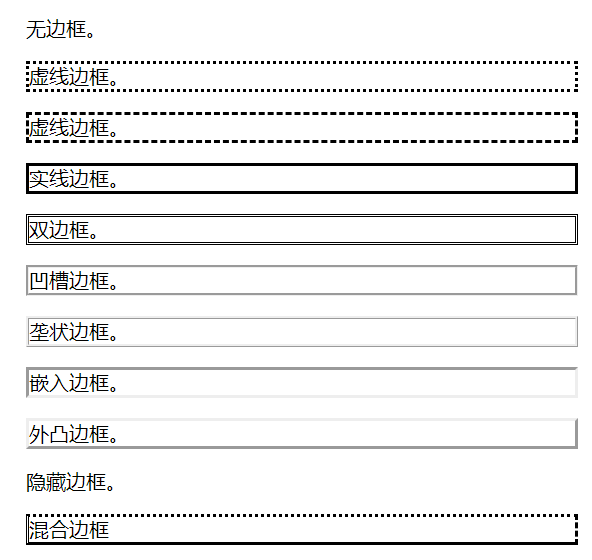
边框样式

border-width 边框宽度

上右下左
左右互补,上下互补,只有一个值共用

CSS Display与Visibility

隐藏元素:
display:none 元素不再占用空间。
visibility: hidden 使元素在网页上不可见,但仍占用空间。

 1
 2
 3
 4
 5
 6
 7
 8
 9
10
11
12
内联元素(inline)特性  
和相邻的内联元素在同一行;
宽度(width)高度(height)内边距的top/bottom(padding-top/padding-bottom)和外边距的top/bottom(margin-top/margin-bottom)都不可改变就是里面文字或图片的大小;

块级元素主要有
 address , blockquote , center , dir , div , dl , fieldset , form , h1 , h2 , h3 , h4 , h5 , h6 , hr , isindex , menu , noframes , noscript , ol , p , pre , table , ul , li

内联元素主要有  
a , abbr , acronym , b , bdo , big , br , cite , code , dfn , em , font , i , img , input , kbd , label , q , s , samp , select , small , span , strike , strong , sub , sup ,textarea , tt , u , var
可变元素(根据上下文关系确定该元素是块元素还是内联元素)

applet ,button ,del ,iframe , ins ,map ,object , script

链接样式

1
2
3
4
a:link {color:#000000;}      /* 未访问链接*/
a:visited {color:#00FF00;}  /* 已访问链接 */
a:hover {color:#FF00FF;}  /* 鼠标移动到链接上 */
a:active {color:#0000FF;}  /* 鼠标点击时 */

水平 & 垂直对齐

元素居中对齐

1
margin: auto;

文本居中对齐

1
text-align: center;

图片居中对齐

1
2
3
4
5
img {
    display: block;
    margin: auto;
    width: 40%;
}

左右对齐

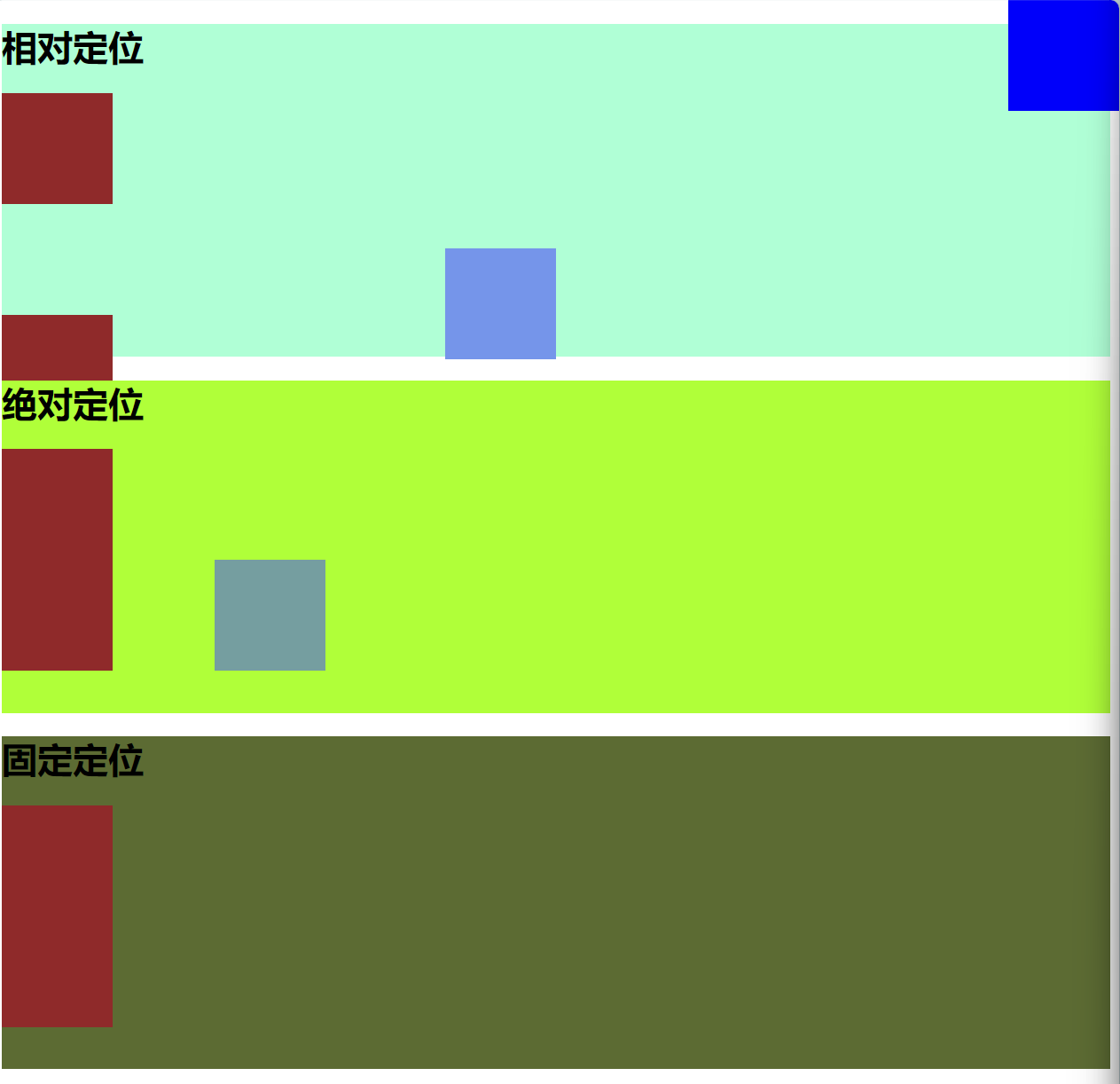
  • 相对定位
1
2
3
4
position: relative;
left: 200px;
/* 相对左偏200px*/
...

不破坏文档流

  • 绝对定位
1
2
3
position: absolute;
left: 200px;
/* 相对左偏200px*/

破坏文档流

  • 固定定位
1
2
3
4
position: fixed;
right: 0px;
top: 0px;
/*必须要定义位置,否则不显示*/

破坏文档流

定位

###Grid布局

 1
 2
 3
 4
 5
 6
 7
 8
 9
10
11
display:grid;//启用grid布局


grid-template-columns: 1fr 1fr 1fr 1fr;//设置列数
grid-template-rows: ;//设置行数

1fr==自由空间多个fr则是等分页面
2fr1fr//r若有两个fr则2fr为fr的两倍或是2/3;

column-gap: 20px;//设置列间距
row-gap: 10px;//设置行间距
Licensed under CC BY-NC-SA 4.0